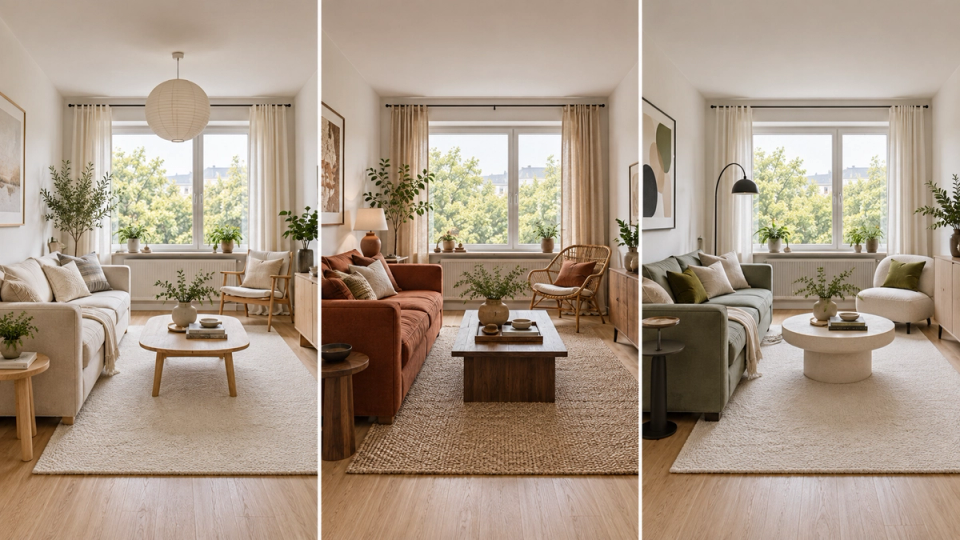
Virtual Staging for Real Estate Without Generic AI Outputs
A workflow guide to virtual staging for real estate: choosing a tool, keeping camera and materials consistent, and MLS disclosure rules to follow.

Virtual staging is the digital process of adding furniture and decor to real estate photographs. It costs a fraction of physical staging, delivers in hours instead of days, and 90% of buyers start their search online. The problem isn't whether to stage. It's that most single-purpose AI tools work only from a flat photo, guessing at a room's geometry from scratch on every regeneration, which is why camera angles drift, materials shift, and results look generic from photo to photo. FORMAS.AI takes a different approach: it orchestrates 50+ specialist AI models in one workspace and can import real 3D or CAD files, GLB, GLTF, OBJ, FBX, STL, Rhino 3DM, or PDF, directly into the canvas, so architects and developers working from actual drawings have real geometry to stage from instead of a photo-only guess.
Finally, a Virtual Staging Workflow Built for Real Estate Teams
If you're a real estate developer, interior designer, architect, or real estate agent producing property marketing visuals, you know the workflow is fractured. One tool removes existing furniture. Another generates virtual furniture placement. A third handles lighting corrections. A fourth stitches it all into a presentable layout. That's four subscriptions, four interfaces, four points of failure.
The bigger issue: generic AI virtual staging tools don't understand your space. They generate pixels, not spatially aware compositions. Camera angles can drift between regenerations. Material properties shift. Architectural details get quietly altered, walls move, windows change shape, trim disappears. That's a structural limitation of staging from a single flat photo, not something every AI tool handles the same way.
FORMAS.AI takes a different approach: it orchestrates 50+ specialist models in a single canvas, and when you have them, you can import your actual 3D or CAD files, GLB, GLTF, OBJ, FBX, STL, Rhino 3DM, or PDF, directly into the workspace instead of relying on a flat photo alone. You maintain design authority while the AI handles the repetitive staging work, so you can deliver tailored results for clients without losing control. The entire process happens in one workspace, not across a stack of disconnected tools. Worth being upfront about: FORMAS.AI isn't a one-click MLS listing stager built to swap furniture into a photo and nothing else. It's a broader AI design platform where staging is one workflow among several.
Why FORMAS.AI Works for Virtual Staging
Here's what separates it from generic AI staging tools and fragmented virtual staging services across the real estate market, where disconnected tools slow teams down and weaken competitive property marketing results:
- Real 3D and CAD import, not just photos. Upload GLB, GLTF, OBJ, FBX, STL, Rhino 3DM, or PDF files directly into the canvas. When you have a model or a drawing, you're staging from real geometry instead of a flat image the AI has to interpret from scratch, a capability photo-only staging tools don't offer.
- 50+ specialist models in one canvas. Instead of stacking a photo editor, an AI generator, a rendering tool, and a presentation app, you orchestrate everything from one workspace. Each model handles what it's best at.
- Freeform Studio is the one piece built in-house. FORMAS.AI didn't train its own foundation model for every task in the pipeline; it routes work to whichever specialist model suits it. Freeform Studio, the sketch-to-render canvas, is the exception the team built itself.
- Authorship stays with you. The AI automates the drudgery. You control the design decisions, furniture placement, styling, and spatial logic. Your virtually staged photos look like your work, not a generic AI output.
- Honest about scope. FORMAS.AI isn't a one-click MLS stager built to turn an empty-room photo into a staged listing image in a single click the way dedicated staging apps are. It's a design platform where staging is one workflow among several, best suited to teams who also need sketch-to-render or 3D visualization work.
Instead of stacking four disconnected tools and re-fixing drift after the fact, FORMAS.AI keeps your project details, reference images, drawings, and 3D files, in one workspace across the entire process.
How Virtual Staging Works in FORMAS.AI
Step 1: Upload Property Photos or Drawings
Import your empty room photos, architectural drawings, or 3D/CAD files (GLB, GLTF, OBJ, FBX, STL, Rhino 3DM, PDF) directly into the canvas. High-quality photography is essential for effective virtual staging, so start with level, well-framed shots that capture the floor plane and at least two walls. Uploaded photo sets can also support virtual tours when teams want consistent visuals across listing assets.
Step 2: Define Materials and Spatial Logic
FORMAS.AI analyzes the geometry of your space and maintains architectural relationships throughout the staging process. Material logic ensures consistent lighting and surface properties. Digital scaling ensures virtually added furniture fits perfectly to scale, and maintaining realistic proportions is critical to avoid buyer disappointment during tours. Using neutral color palettes can make spaces feel larger and more appealing to potential buyers.
Step 3: Generate Staged Variations
Create multiple furniture arrangements while preserving space accuracy. Iterate on styling, swap layouts, test different design aesthetics to appeal to specific buyer segments, and produce variations suited to different market positioning strategies. When you're working from an imported 3D file or CAD drawing, you're iterating against real geometry rather than a flat image the AI has to reinterpret each time. Creating realistic designs requires understanding the target demographic's preferences, and virtual staging allows for customization to match those preferences without extra cost.
Just iterations that produce a clear representation of the property, without stacking four separate tools to get there.
What Makes FORMAS.AI Different from Virtual Staging Tools
Most virtual staging tools fall into one of three categories: generic AI generators that create images from a prompt without spatial control, specialized single-purpose staging tools that handle one function and require a stack of other tools for the rest of the workflow, or designer-led services where a human manually edits each photo, priced at $20 to €50+ per image with 24 to 48 hour turnaround time.
FORMAS.AI is none of these. It's an orchestration workspace. Teams can also pair staged stills with drone footage for a more complete property presentation workflow.
- 3D/CAD file import. Generic AI tools like Midjourney don't support it, photo only. Specialized staging tools rarely support it. FORMAS.AI imports GLB, GLTF, OBJ, FBX, STL, Rhino 3DM, and PDF.
- Architectural fidelity. Generic AI tools often alter structure. Specialized staging tools typically edit an existing photo rather than generate new geometry, so structural elements usually stay unchanged. FORMAS.AI works from real geometry when a 3D file or drawing is provided.
- Workspace. Generic AI tools run a single model for one task. Specialized staging tools require stacking multiple tools. FORMAS.AI orchestrates 50+ specialist models in one canvas.
- Design authorship. Generic AI tools produce generic output. Specialized staging tools are template-driven. FORMAS.AI keeps design decisions with you.
- One-click, single-purpose staging. Generic AI tools aren't built around a single-click MLS workflow. Specialized staging tools are built around a single-click, single-purpose MLS staging workflow. FORMAS.AI is built differently, as a broader design platform where staging is one workflow among several.
The real competitor to FORMAS.AI isn't legacy rendering software like Lumion or Enscape. It's frontier models like Midjourney or Krea that give you speed but strip away control. FORMAS.AI keeps the control they strip away.
Virtual staging can define the function of awkward spaces in a home, something generic AI tools struggle with because they don't understand spatial relationships. It replaces physical furniture in real estate photos without any physical change to the space itself, but only when the tool preserves the room's actual geometry.
Proof That Control Matters in Virtual Staging
The numbers make the case for staging in general, whether virtual or physical. The National Association of Realtors' (NAR) 2025 Profile of Home Staging found that 29% of sellers' agents reported staging increased a home's offer price by 1% to 10%, and 49% saw a staged listing spend less time on the market. The same report found 83% of buyers' agents said staging makes it easier for buyers to picture themselves living in a home. On cost, Redfin puts full physical staging at $600 to $4,000 for a whole home, or $300 to $700 per room, versus $39 to $199 per room for virtual staging, the gap that makes virtual staging worth testing before committing to a physical stager.
But these numbers assume your staged photos are accurate. When camera drift creates inconsistency between shots, or when virtual furniture floats above the floor, or when architectural details get altered, your marketing efforts work against you. Approximately 90 percent of buyers struggle to visualize empty rooms, so they depend on your staged images to form an emotional connection with the property. If those images don't match the real life walkthrough, trust collapses.
Here's what goes wrong with uncontrolled AI staging:
- Camera drift between shots of the same room can make it look like two different properties, especially across multiple angles of the same space, a recognized challenge for AI tools that work from a single flat photo with no underlying 3D reference.
- Material shifts between regenerations produce inconsistent flooring, wall colors, and furniture textures. Prospective buyers notice.
- Architectural misrepresentation violates MLS rules. Most MLS systems prohibit modifications that misrepresent structural features. Clearly labeling virtually staged photos builds trust with potential buyers.
Working from accurate source material, real photos, drawings, or an imported 3D file, cuts down on these problems and shortens approval cycles. That accuracy matters even more in virtual reality, where immersive viewing makes inconsistencies obvious. Real estate professionals send fewer images back for correction, and branding agencies get more consistent visuals across property listings when the AI has better geometry to start from.
3D renderings help buyers visualize a property, reduce doubts during decision-making, and can showcase a property in any condition, whether it's move-in ready or still under construction. Listings with professionally staged photos also tend to attract more clicks and inquiries than listings with empty rooms.
Who Virtual Staging in FORMAS.AI Is For: Real Estate Agents and More
FORMAS.AI is built for teams who need control over their visual output, not just speed:
- Real estate developers needing early imagery before construction completion. When drawings exist but walls don't, you can virtually stage from floor plans and architectural drawings to create marketing materials for a future project. Virtual staging can create realistic photos for a few hundred dollars versus the several thousand dollars traditional staging demands.
- Interior design studios producing client visuals on tight deadlines. You need photorealistic visualizations that reflect your design intent, not generic AI suggestions. Interior designers maintain authorship while the AI handles the repetitive staging tasks. Virtual staging offers fast turnaround times compared to traditional physical staging.
- Architectural practices creating real estate renderings for residential and commercial projects. Whether it's architectural visualization for a new development or exterior renderings paired with staged interiors, one workspace handles the entire process, including Architectural Rendering Services. 3D renderings help buyers visualize themselves in a space and save time and resources in marketing.
- Real Estate Agents and teams requiring consistent branding across property listings. When every listing needs to match your visual standards, you can't afford camera drift or material inconsistency between images. High-quality visuals increase inquiries and visits to listings. Virtual staging helps buyers visualize their own furnishings in the space, making it a powerful tool for increasing buyer interest.
If you're spending time fixing outputs from generic AI tools, or paying for four subscriptions to cover one virtual staging project, FORMAS.AI consolidates your workflow.
Virtual Staging Pricing and Access
Free Tier: Get Started
500 credits on signup. 50 credits monthly after that. Enough to test the virtual staging workflow, upload property photos, and generate your first staged variations. No credit card required.
Student Tier: Campus Access
$19.90 per month for architecture and design students. Full access to the staging workspace and material libraries. If you're studying architectural projects or interior design, this gives you a cost effective way to produce high resolution images and final renderings for coursework and portfolios.
Professional Plans
Pricing scales with usage. Team and Studio features are marked as Available Soon on the pricing page, designed for practices and studios with multiple users. Check current pricing for the latest details.
Virtual staging is significantly cheaper than traditional staging. Traditional staging can cost thousands of dollars in furniture rentals, transportation, and setup. Virtual staging avoids expensive furniture rentals entirely. Virtual staging costs €21.00 per image with many services, and can be done for a few hundred dollars total. FORMAS.AI's credit-based pricing keeps costs predictable as you scale, with great prices for teams that need repeated staging output.
Virtual Staging Frequently Asked Questions
Can FORMAS.AI work from 3D or CAD files instead of just photos?
Yes. FORMAS.AI imports GLB, GLTF, OBJ, FBX, STL, Rhino 3DM, and PDF files directly into the canvas, alongside standard room photos. That's a genuine differentiator from photo-only staging tools: when you have an existing 3D model or architectural drawing, you're staging from real geometry instead of an image the AI has to interpret from scratch.
Can I use existing property photos for virtual staging?
Yes. Upload property photos directly to the canvas. FORMAS.AI analyzes the spatial geometry from your images and maintains architectural relationships. Better input produces better output, so level, well-framed shots with visible floor plane and walls give the best results.
What's the difference between FORMAS.AI and Midjourney for staging?
Midjourney generates a single realistic image from a prompt, with no way to import a real floor plan, 3D model, or CAD file to ground the result. FORMAS.AI orchestrates 50+ specialist models in one canvas and can import GLB, GLTF, OBJ, FBX, STL, Rhino 3DM, or PDF files directly, so you can work from actual project geometry instead of a text description alone. One produces a realistic image from a prompt. The other produces a final result grounded in your actual project data.
Do I need rendering experience to create virtual staging?
No. FORMAS.AI automates the technical complexity of lighting, shadowing, and material rendering. You make design decisions, choose furniture, define layout. The platform handles the detail required for photorealistic output. It also supports immersive presentation workflows that can connect with VR technology without requiring advanced rendering expertise.
How quickly can I generate staged variations of a property?
Human-edited virtual staging services can take up to 48 hours per image. FORMAS.AI generates variations in-workspace instead of through a manual edit queue, without sacrificing design control or accuracy. The turnaround time depends on how many variations you want to explore.
Start Virtual Staging with Design Control
Virtual staging for real estate works when the output is accurate, grounded in your actual space, and under your control. Generic AI tools give you speed but take away that grounding. FORMAS.AI keeps that grounding, plus a way to bring your real project files into the process.
One workspace. 50+ specialist models. Real 3D and CAD import. Your design authority preserved.
Over 90% of buyers start their home search online, needing compelling visuals, and NAR's own research shows staging measurably shortens time on market and helps buyers picture themselves in a home. Digital staging provides immediate visual context for potential buyers. Virtual staging enhances online listing photos to help Real Estate Agents serve their clients more effectively, increase buyer interest, and create a strong first impression for vacant homes and properties at different stages of development.
Stop stacking tools. Start staging with control, and with real project data behind it. Start free and validate quality before committing to a paid plan.